
Copy any blog post to Markdown — or open it in ChatGPT, Claude, or Perplexity
Every article on The Forward now has a one-click Copy Page menu — grab it as clean Markdown for LLMs, or hand it straight to ChatGPT, Claude, or Perplexity to ask questions about it.
What shipped
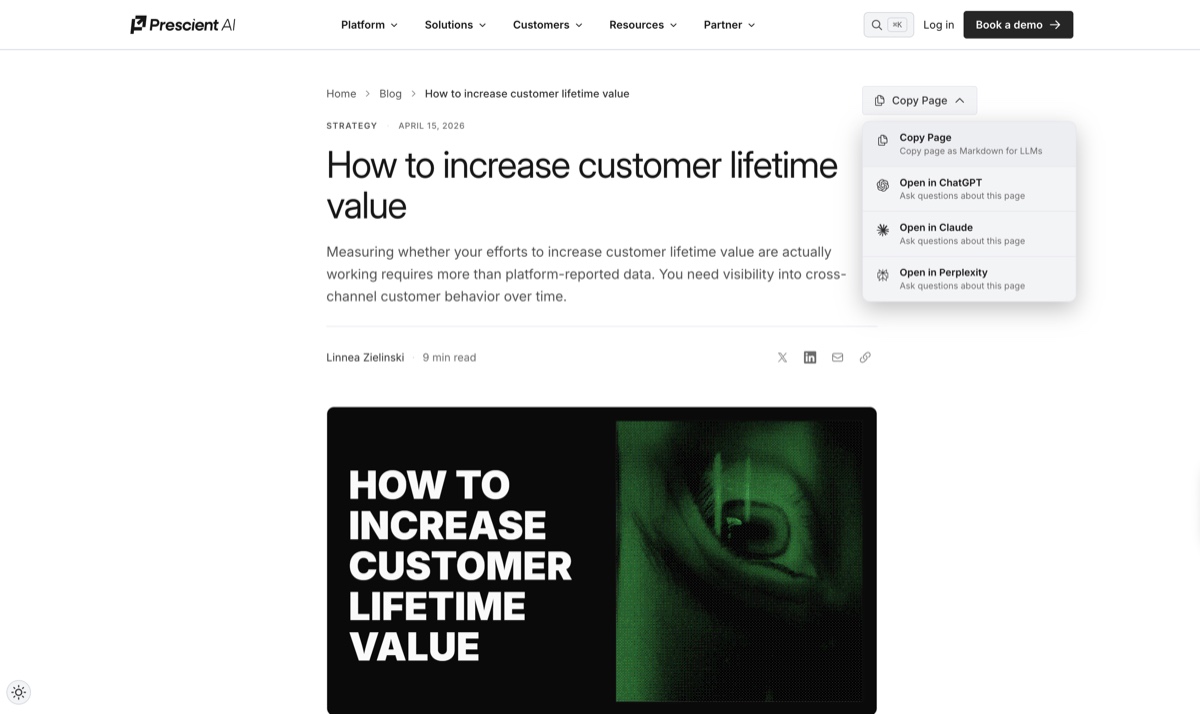
A Copy Page menu on every post on The Forward. You'll find it in the top-right of any article. Click it and you get four options:
- Copy Page — grab the whole post as clean Markdown, formatted for LLMs
- Open in ChatGPT — launch ChatGPT with the article preloaded
- Open in Claude — same thing, in Claude
- Open in Perplexity — same thing, in Perplexity
One click. No copy-paste gymnastics, no stripping out nav and footer cruft, no reformatting.
Why it matters
The way marketers research is changing. People aren't just reading articles — they're running them through ChatGPT to summarize, through Claude to pressure-test an argument, through Perplexity to compare against other sources.
We'd rather meet you where you already work than make you fight our site to get our ideas into your workflow. If you read the Prescient blog to sharpen your thinking on MMM, halo effects, saturation curves, or forecasting, this puts every post one keystroke away from the model you actually use.
How to use it
- Open any article at prescientai.com/blog.
- Click Copy Page in the top-right of the post.
- Pick your action:
- Copy Page — copies the article as Markdown to your clipboard. Paste anywhere — a prompt, a Notion doc, a Slack message.
- Open in ChatGPT / Claude / Perplexity — opens a new tab in the model with the article already loaded, ready for questions.
A few things it's useful for
- Summarize a long post before a meeting.
- Extract the argument — ask the model to boil a 2,000-word article down to its claim, proof, and conclusion.
- Pressure-test it — "Where would a skeptical CFO push back on this?"
- Pull specific numbers or definitions without re-reading the whole piece.
- Draft a follow-up — turn a post into talking points, a LinkedIn comment, or an internal doc.
Under the hood
The Markdown export strips the page down to the article itself — headline, byline, body, quotes, tables, images. No navigation, no footer, no CTA. The LLM hand-off uses each model's standard URL-loading pattern, so the article arrives in the chat context ready for prompting.
Start here
How to increase customer lifetime value — the newest post. Hit Copy Page, pick your model, and ask it what it thinks.