




How to measure Meta effectively (Ads Manager doesn't tell the whole story)
Meta Ads Manager shows you useful data, but not the full picture. Here's how to measure Meta effectively, from the right metrics to revenue your dashboard misses.
Linnea Zielinski · 12 min read

A scoreboard that only counts some of the points is worse than no scoreboard at all. At least with no scoreboard, you know you're guessing. When a scoreboard exists but silently omits a third of the scoring, you make decisions with false confidence, and that's the harder problem to recover from.
Meta Ads Manager is a legitimate, capable tool. But for most brands running Meta ads, it functions as that incomplete scoreboard: reporting real data, just not all of it. The platform reports what it can measure inside its own ecosystem, which misses a meaningful share of what your Meta ad campaigns actually drive. For brands with serious ad spend on the line, understanding where Ads Manager ends and where true business impact begins is one of the highest-leverage things you can do for your advertising strategy.
Key takeaways
- The right metrics for Meta ads depend entirely on your campaign goal: return on ad spend (ROAS) and cost per purchase for conversion campaigns, cost per lead for lead generation, and CPM with ThruPlay rate for awareness campaigns.
- Meta Ads Manager gives you useful, real-time performance data, but it only reports on what happens inside Meta's ecosystem; conversions that happen on other channels after Meta exposure don't show up.
- Meta's reported return on ad spend can be higher than your true blended return because it counts view-through conversions and overlaps with credit other channels are also claiming for the same sales.
- Most marketers focus on click-through rate as a creative signal, which is reasonable, but CTR and cost per conversion answer different questions and shouldn't be used interchangeably.
- Halo effects are real on Meta: awareness campaigns regularly drive branded search lifts, direct traffic spikes, and cross-channel conversions that Ads Manager has no way to report.
- The Conversions API improves signal quality and helps Meta's algorithm optimize better, but it doesn't solve the attribution problem or make Meta's reporting unbiased.
- Marketing mix modeling is the only approach that gives you an independent, cross-channel view of what your Meta ads are actually contributing to revenue.
Metrics that matter by campaign goal
Before getting into where Meta measurement gets complicated, it's worth establishing the foundation: the right metrics depend on what you're trying to accomplish. One of the most common mistakes in Meta advertising is applying conversion-focused benchmarks to campaigns that were never designed to drive direct conversions.
Here's a practical reference for matching key performance metrics to campaign goals:
| Campaign goal | Primary metric | Early-signal indicator |
| Purchases / e-commerce | Return on ad spend, cost per purchase | Add-to-cart rate, click through rate |
| Lead generation | Cost per lead, lead conversion rate | Landing page views, link CTR |
| Brand awareness | CPM, ThruPlay rate, reach | Frequency, video views |
| Traffic / consideration | Cost per click, conversion rate | Click through rate, engagement rate |
A few things worth noting about this table:
- Click through rate is genuinely useful as an early signal: if you're running a new Facebook ad and CTR is very low, that's meaningful creative feedback before you've spent enough to see conversion data.
- A higher CTR doesn't automatically translate to better business outcomes downstream. Many marketers have experienced the frustration of a high-CTR Facebook ad that produces poor sales because the creative attracted the wrong audience or set up a promise the landing page didn't deliver on.
- CTR tells you whether the ad got attention. Conversion rate and cost per purchase tell you how much revenue each dollar spent actually generated, and those are the metrics that map most directly to business outcomes.
Similarly, for awareness campaigns, video views and ThruPlay rate tell you whether your ad captured attention, but they're not the full picture of what that awareness is doing for your business. More on that shortly.
What Meta Ads Manager does well
Meta Ads Manager is genuinely good at the things it was designed to do, and dismissing it as unreliable misses the point. The Meta Ads Manager dashboard gives you real-time campaign performance data across every ad set and creative, which is operationally important for anyone actively managing Meta ad campaigns. Your ad account dashboard is the central place to track ad set performance, diagnose creative issues, and optimize spend allocation across campaigns before small problems become expensive ones.
For day-to-day campaign management, Ads Manager is the right tool for:
- Monitoring ad set performance: Identifying which ad sets are spending efficiently and which are generating wasted spend before the losses compound. Reviewing performance metrics at the ad set level regularly lets you reallocate budget toward what's working rather than letting underperforming ad sets drain your budget.
- Managing frequency: Frequency (the average number of times someone in your target audience has seen your ad) is one of the most important signals for diagnosing ad fatigue. For broad audiences, aim for 2–4. For retargeting, higher frequency is generally acceptable. When frequency climbs and performance drops together, that's a clear signal to refresh creative formats.
- Reading creative signals: Hook rate and click through rate are the key Meta ad metrics for diagnosing whether a Facebook ad is landing before you have enough conversion data. A low CTR is a useful early signal: it usually means the audience targeting isn't matching the creative, or the creative isn't stopping the scroll. Catching a low CTR early and making adjustments to fine tune the ad is much cheaper than letting an underperforming ad run for two weeks before reviewing performance.
- Respecting the learning phase: Meta's algorithm needs roughly 50 conversions per ad set per week to exit the learning phase and optimize properly. Pulling the plug on new campaigns before that threshold is one of the most common mistakes brands make. Give Meta's algorithm enough data before drawing conclusions about campaign success.
- A/B testing: Ads Manager's built-in testing tools let you isolate one variable at a time (creative, audience, copy) and read performance data at the campaign level without cross-contamination. Testing one variable at a time is the only way to know what actually caused a performance difference.
The ceiling is that Ads Manager reports on what Meta can observe, and Meta can only observe what happens inside its own ecosystem.
Why Meta's reported ROAS isn't your actual return on ad spend
Most marketers focus on the Meta ad metrics Ads Manager surfaces most prominently, but a few structural issues mean those numbers deserve some skepticism.
Meta's return on ad spend figure looks attractive for several reasons that have nothing to do with your campaigns performing well:
- View-through attribution. Meta's default attribution settings include conversions from people who saw an ad but never clicked. If someone sees your Facebook ad on Monday, ignores it, and buys from your website on Wednesday after a Google search, Meta counts that as a Meta conversion. Many of those conversions would have happened anyway.
- The double-counting problem. Meta isn't the only platform claiming that conversion. Google is likely claiming it too, and so is your email platform. When you add up the attributed revenue across all your channels, the total almost always exceeds your actual revenue. Meta's default attribution settings are aggressive enough to make the gap particularly wide. Prescient has seen this with incoming clients whose in-platform reporting across channels added up to more than their total revenue.
- The self-reporting problem. Meta has a financial incentive to show your campaigns performing well. Meta is also facing legal scrutiny over inflated reporting metrics. Their numbers aren't audited by a neutral party, and they never will be. That's not a reason to stop running Meta ads, it's a reason to verify the numbers with a tool that doesn't have a stake in the outcome.
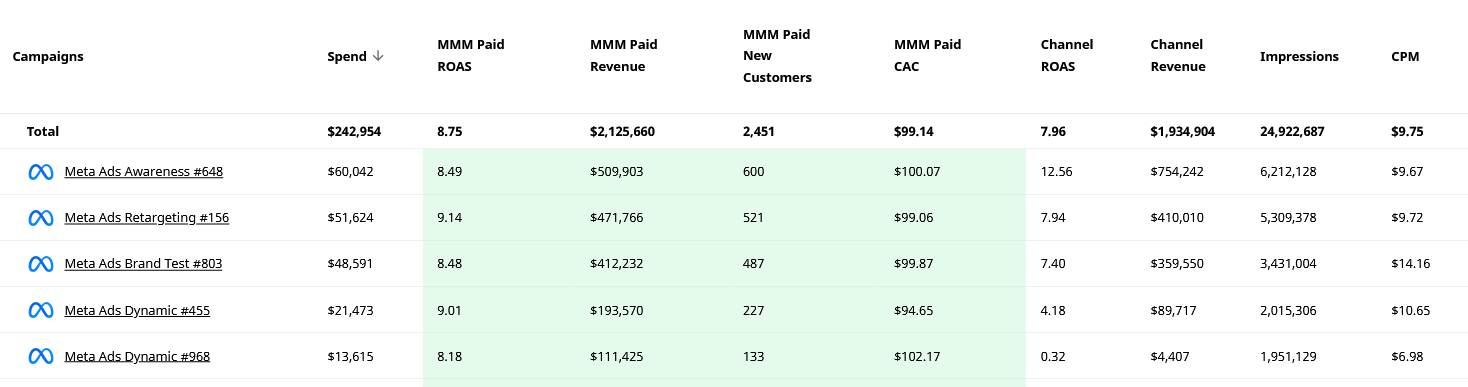
None of this means your Meta ads aren't working. It means Meta's reported return on ad spend can be a different number than your actual return, and making budget decisions based on Ads Manager alone means optimizing toward an inflated benchmark. The gap can be significant: in Prescient's platform, you can see MMM-attributed ROAS and channel-reported ROAS side by side at the campaign level. The difference is often striking, and in some cases, campaigns that look weak in Ads Manager turn out to be strong performers when the full picture is modeled, while others that look efficient show a fraction of their reported ROAS once the overcounting is removed.
A practical benchmark check: If you're asking whether a 2.5 ROAS is good, the honest answer is that it depends entirely on your profit margins and blended marketing efficiency ratio. A 2.5 ROAS might be strong for a brand with healthy margins and modest fixed costs. For a brand with thin margins and significant overhead, the same number could mean you're losing money on every dollar spent. Before benchmarking your return on ad spend against industry averages, make sure you know what ROAS you need to actually cover your costs.
The halo effects Meta isn't showing you
While Meta takes credit for some conversions it didn't drive, it also gets zero credit for real impact that shows up somewhere else.
Top-of-funnel Meta campaigns, prospecting ads, awareness campaigns, video ads designed to introduce a brand, generate what Prescient calls halo effects: the spillover revenue that shows up in other channels because of Meta exposure. A prospecting campaign might look like it barely breaks even in Ads Manager, but it's simultaneously:
- Driving branded search volume as people who saw the ad look the brand up later
- Fueling organic searches for terms related to your category and brand
- Increasing direct traffic from users who remembered the brand name
- Feeding retargeting and conversion campaigns with warm audiences who convert at much higher rates
- Lifting Amazon sales for brands that sell there
None of that shows up in Ads Manager. The awareness campaign gets evaluated on its direct return on ad spend, looks weak, gets cut, and then everything downstream quietly deteriorates because the top of funnel stopped working. Most marketers who've managed Meta ads long enough have experienced this pattern even if they didn't have language for it.
Awareness campaigns on Meta should never be evaluated purely on direct cost per conversion or return on ad spend. Those are the wrong metrics for the right campaigns. A few quick tips for evaluating upper-funnel campaigns more accurately:
- track branded search volume trends in the weeks following a prospecting flight
- monitor direct traffic for correlation with Meta spend
- review retargeting campaign performance as a downstream health signal for your awareness work
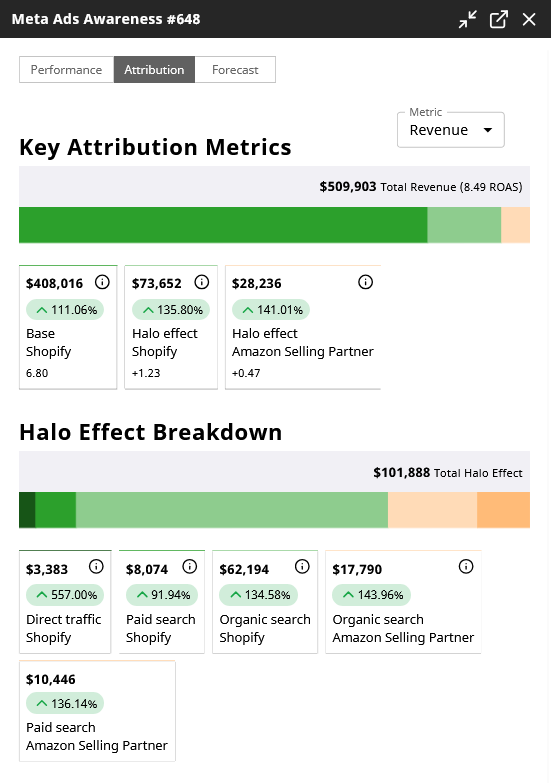
Here's what that looks like in Prescient's platform for a single awareness campaign: $509,903 in total revenue attributed, with $101,888 of that coming from halo effects across organic search, paid search, and direct traffic channels: revenue that Ads Manager reported zero credit for.
The Conversions API is necessary but not sufficient
Implementing the Conversions API (CAPI) is a meaningful step up from relying on the browser-based Meta Pixel alone. CAPI sends conversion data server-side, bypassing browser restrictions, ad blockers, and iOS privacy limits that degrade pixel signal. Better signal quality means Meta's algorithm can optimize more effectively and helps Meta's algorithm fine tune delivery toward audiences most likely to convert.
The important caveat: CAPI makes Meta better at seeing what happened inside its observable universe. It doesn't expand that universe. (We've previously covered server-side tracking and why it doesn't fix all of your tracking issues.)
Setting up CAPI correctly involves connecting your server events to Meta through a direct API integration or a third-party partner. Verify the event match quality score in Events Manager; a score above 7 is generally solid. Use UTM parameters consistently across all Meta ads to cross-reference Meta's attribution data with your own analytics, even knowing the numbers won't align perfectly.
Why default attribution settings probably don't fit your business
Meta's default attribution settings (7-day click, 1-day view) were designed for businesses with short purchase cycles. For many Meta ads, that window is reasonable. For businesses selling higher-consideration products, anything where customers typically take more than a week to decide, the default window is excluding real conversions while simultaneously including view-through credit that may not be earned.
Attribution settings are worth auditing for your specific business. Here are some quick tips on how to think about the right window:
- Short consideration cycle (impulse purchases, low-cost consumables): 7-day click, 1-day view is likely appropriate.
- Medium consideration cycle (apparel, beauty, home goods): 7-day click, 1-day view to start; consider 28-day click for campaigns where you know the purchase cycle runs longer.
- High consideration cycle (furniture, software, high-ticket items): 28-day click; be skeptical of view-through attribution entirely.
Fine tuning these settings is one of the highest-impact decisions you can make, because it changes not just what gets counted but what Meta's algorithm optimizes toward and which audience targeting parameters it pursues. If you're using a 7-day click window for a product with a 30-day decision cycle, you're telling Meta's algorithm to find people who make expensive decisions impulsively. Those people exist, but there aren't a lot of them and they're probably your best customers for long-term campaign success.
Last-click attribution specifically tends to undervalue awareness campaigns and overvalue retargeting, because retargeting naturally captures users who are already close to converting regardless of whether the retargeting ad was the deciding factor. Last click attribution is what most analytics tools default to, which is part of why Meta's upper-funnel campaigns so often look weaker than they actually are.
Why independent measurement closes the gap
Given everything above (overcounting on direct conversions, zero credit for halo effects, and attribution settings that may not fit the purchase cycle), the honest picture is that Ads Manager is a useful operations tool that shouldn't be the final word on whether Meta advertising is working.
The right approach is to run Ads Manager alongside an independent measurement method. Two options worth knowing:
Marketing mix modeling (MMM) looks at the statistical relationships between Meta ad spend and revenue outcomes across all channels over time. It doesn't rely on pixel tracking, doesn't require following individual users, and isn't subject to the self-reporting bias in any platform's native tools. For brands with multiple campaigns running simultaneously, MMM can show you campaign-level attribution and key performance metrics: not just whether Meta as a channel is driving revenue, but which campaigns and ad sets are contributing, which are generating wasted spend, and how to optimize your ad account for more revenue across every channel it influences. Some MMM providers also capture halo effects by observing how Meta activity correlates with branded search, organic traffic, and other downstream revenue channels.
Incrementality testing can complement MMM by measuring whether specific campaigns are generating revenue that wouldn't have happened otherwise. Prescient's Validation Layer runs parallel model versions with and without external test data to assess whether calibration improves model accuracy, giving you a principled check on whether your test results are adding signal or noise.
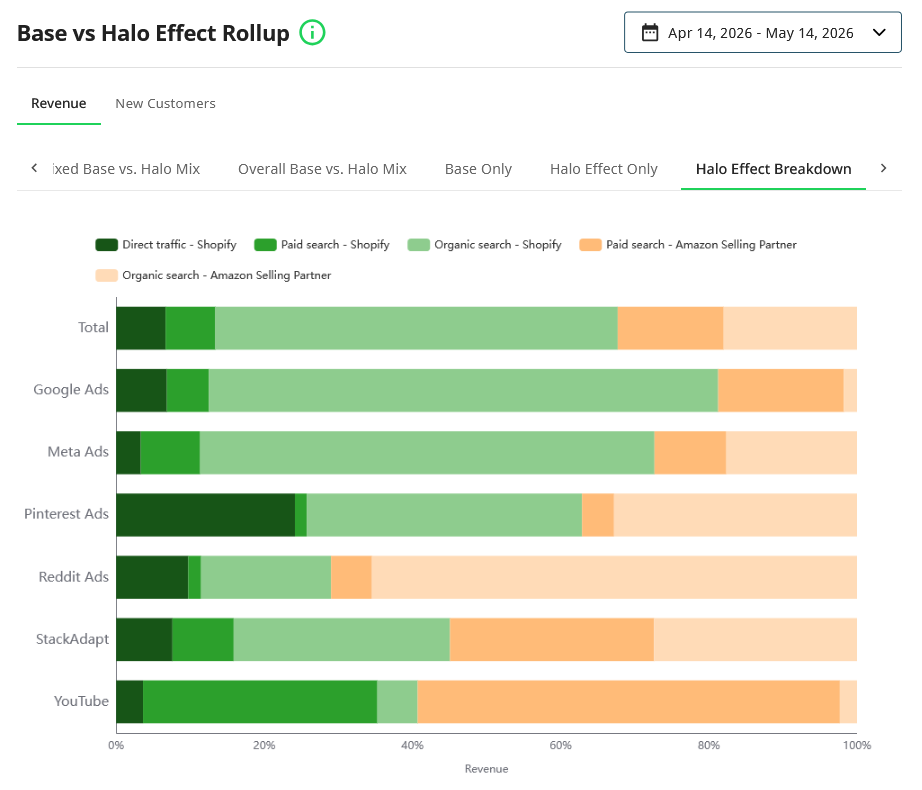
The chart below shows the Base vs Halo Effect Rollup on the Prescient platform across all channels for a 30-day period. For Meta Ads specifically, a significant portion of total revenue attribution comes from halo effects in organic search and Amazon, channels that Ads Manager has no visibility into.
Where Prescient comes in
Prescient's marketing mix model measures Meta's full contribution across every connected revenue channel, including the halo effects that Ads Manager will never report. The model updates daily at campaign level, so you're not waiting for a monthly read to understand whether your Meta ad campaigns are driving revenue or burning budget. When Ads Manager tells you an awareness campaign is barely breaking even, Prescient shows you what it's actually doing for branded search, direct traffic, and downstream conversion performance, without relying on Meta's self-reported numbers.
For brands that have been trusting Ads Manager to make budget decisions, the independent picture often looks materially different: sometimes better, sometimes worse, but always more accurate. Our team of experts will walk you through all of this when you book a demo.
FAQs
Is a 2.5 ROAS good for Meta ads?
It depends on your profit margins, not on any universal benchmark. A 2.5 return on ad spend might be genuinely profitable for a brand with healthy margins and low customer acquisition cost, or it might mean you're losing money if your margins are thin and your fixed costs are high. The more important question is what ROAS you need to cover costs and grow, and whether Meta's reported return on ad spend actually reflects your true return once overlapping attribution with other channels is accounted for. Most brands find that Meta's reported ROAS overstates actual performance by a meaningful amount.
What are good metrics for Meta ads?
The right metrics depend on your campaign goal. For conversion campaigns, return on ad spend and cost per purchase are the right primary metrics. For lead generation, focus on cost per lead and lead conversion rate. For awareness campaigns, CPM, ThruPlay rate, and reach are more appropriate than conversion-focused metrics. Click through rate is a useful early creative signal across all campaign types, but a higher CTR doesn't guarantee better outcomes, it tells you whether the ad got attention, not whether it drove business results.
How do you know if a Meta ad is working?
The answer changes depending on how long the campaign has been running. In the first few days, hook rate and click through rate tell you whether the creative is resonating before you have enough conversion data. Once a campaign has enough data (roughly 50 conversions per ad set), cost per purchase or target CPA against your actual margin target is the right measure. For awareness campaigns, look beyond Ads Manager: branded search volume, direct traffic trends, and downstream retargeting performance are better indicators than any metric the platform surfaces directly.
Why is my Meta-reported ROAS higher than what I see in Google Analytics?
Because they're measuring different things. Meta counts conversions using its own attribution settings, including view-through conversions and cross-device sessions. Google Analytics uses last-click attribution by default and only tracks sessions that originated from a measurable click. Neither one is capturing the full picture, but the gap between them reflects real structural differences in how each tool assigns credit. The most accurate read on Meta's true contribution comes from an independent measurement method that isn't subject to either platform's self-reporting bias.
The Halo
Exclusive insights, every week.
Subscribe to The Halo for sharper marketing thinking.
You're subscribed to The Halo!
Quick question (optional): How familiar are you with MMM?
Thanks for sharing! Enjoy The Halo.
Keep reading
View all
How effective is direct mail marketing? What the numbers show and what they miss
Read article
Top of funnel vs bottom of funnel: How they differ and how to balance your budget
Read article
Modern marketers need to be doing marketing scenario planning
Read article
How to actually optimize your ad spend (not just cut waste)
Read article
How to build an always-on marketing strategy that actually compounds
Read article
Your peak-season ROAS targets are probably wrong for retail too
Read article