




When to act on an optimizer recommendation vs. when to wait
Master when to act on Prescient optimizer recommendations, when to wait, and when to modify, using confidence scores, projected lift, and strategic context.
Linnea Zielinski · 7 min read
A flight dispatcher and a weekend hiker can look at the same weather forecast and arrive at completely different decisions. The dispatcher isn't being reckless if they clear a flight through 30% chance of rain, and the hiker isn't being overcautious if they reschedule.
Optimizer recommendations in Prescient work in a similar way. The platform finds the most mathematically efficient budget allocation based on your attribution data and saturation curves, and it shows you the projected outcome alongside a confidence score. That's the forecast. What you do with it (act, modify, or wait) depends on context only you can bring. Getting that decision right consistently is one of the highest-leverage skills you can build as a Prescient user, and we want to help you hone it.
Key takeaways
- The Optimizer finds the most mathematically efficient budget allocation based on Prescient's attribution model and saturation curves, but it doesn't account for campaign-specific context like upcoming creative changes, funnel role, or audience constraints.
- Recommendations appear at three levels (channel, tactic, and campaign), but the most actionable decisions typically happen at the campaign level, where you can accept, decline, or modify individual spend changes.
- You don't have to respond to every recommendation; campaigns that aren't accepted simply won't be tracked.
- Three signals point toward acting now: meaningful projected lift, Medium or higher confidence, and no near-term strategic conflicts with the recommendation.
- Three signals point toward waiting or modifying: Low confidence on an established campaign, a recommendation that conflicts with something upcoming, or a significant budget change in the past week that the model hasn't fully stabilized around.
- After a budget shift of roughly 20% or more, give the model about 7 days before running a new optimization, because scenarios built on pre-change data can produce recommendations that don't reflect your current spend reality.
- The Customize Recommendations feature is a designed-in third path between accepting and declining. Use it to lock campaigns that can't move and re-run the optimization around the rest of your portfolio.
What the Optimizer is and isn't telling you
Prescient's Optimizer is a mathematical tool. It looks at your attribution data and saturation curves and finds the allocation that maximizes ROAS or minimizes CAC within your budget constraints. It's very good at that job (we’re quite proud of it). What it can't do is account for the things it doesn't know: that your top Meta campaign is getting new creative in two weeks, that you have a promotion launching next month, or that one of your campaigns is running in a market where audience size limits what scale is actually achievable.
That gap between what the model knows and what you know is where the act vs. wait decision lives. Every recommendation is worth reading through three lenses before you accept it: projected impact, confidence, and strategic fit. When all three clear a reasonable bar, acting is usually the right call. When one of them raises a flag, that's the signal to pause and figure out why before committing.
Prescient surfaces recommendations at three levels: channel, tactic, and campaign. (We know, we know, enough with the 3s; it’s just how it worked out.) Channel-level and tactic-level views are useful for getting a read on directional shifts across your portfolio, but the most consequential decisions happen at the campaign level, where you're accepting or declining specific spend changes and setting implementation dates that trigger tracking. That's where the framework below applies most directly so it’s where we’ll focus this article.
For a deeper explanation of what confidence scores are measuring and how to read them, this article walks through all three inputs and what low confidence is actually telling you.
Signals that point toward acting now
Not every recommendation warrants a long deliberation. When the data is solid and the context is clear, acting quickly and tracking the outcome is often the best move, both for performance and for building the spend history that makes future recommendations more reliable.
The projected lift is meaningful relative to your current spend
The Outcome screen shows expected revenue or new customer counts against a No Change projection. Before accepting, look at the size of the gap and whether it's proportional to the spend change being recommended. A meaningful lift on a modest budget adjustment is a strong starting signal. A small lift that requires a large spend increase warrants more scrutiny.
Look at the percentage difference as well as the dollar figure. The same dollar lift reads very differently depending on the scale of the campaign it's attached to.
Confidence is Medium or higher
Medium confidence (51–69%) and above means the model has enough historical data to generate a reasonably reliable prediction for this campaign at this spend level. That's not a guarantee of success (confidence reflects data reliability, not probability of outcome), but it does mean the recommendation is grounded in meaningful signal rather than limited data.
If you're not sure how your risk tolerance maps to the confidence level you're seeing, this article on assessing your risk tolerance for big swings walks through how to think about it.
No near-term strategic conflicts exist
Before accepting, ask: is there anything happening in the next 14–28 days that would make this recommendation premature or irrelevant? A campaign that's getting new creative, a promotion that's about to shift spend patterns, or a planned budget review that might change your total envelope are all reasons to pause. If none of those apply, you're generally clear to act.
Signals that point toward waiting or modifying
These aren't automatic stop signs. They're prompts to ask a more specific question before committing.
Confidence is Low on an established campaign
Low confidence (0–50%) means the model has limited data to work with at the recommended spend level. For newer campaigns, that's expected because they're still accumulating history, and gradual budget increments are a reasonable way to build the data that lifts confidence over time. For an established campaign that's been running for multiple cycles, a Low score is worth investigating before you move.
The most common explanation is a recent budget change that the model is still stabilizing around. If your spend shifted significantly in the past week or two, the model may not yet have enough post-change data to produce a high-confidence recommendation at the new level. Waiting for that stabilization to happen is usually the right call.
The recommendation conflicts with something you know the model doesn't
This is the most common reason to modify rather than outright accept or decline. If the Optimizer is recommending a scale-up on a campaign that's about to get new creative, accepting immediately doesn't reflect the reality you're operating in. If a campaign has audience size limitations that cap how much additional spend can actually reach new users, the model can't factor that in.
In these cases, the right move is to use the Customize Recommendations feature to lock the affected campaign at its current spend and re-run the optimization around the rest of your portfolio rather than declining outright. The recommendation you get back will be more useful because it's working with constraints the model now understands.
You changed budgets significantly in the last week
Per Prescient's best practices, if budgets shifted by roughly 20% or more in the past two to three days, it's worth waiting about 7 days before running a new optimization. Scenarios built on pre-change data can produce recommendations that don't accurately reflect your current spend level, which means the projected outcomes may not hold once implemented. Giving the model time to incorporate the new spend patterns produces a cleaner input and a more reliable recommendation.
When to modify instead of accept or decline
Most users default to a binary: accept what looks good, decline what doesn't. The Customize Recommendations feature is a designed-in third path that's worth using more often.
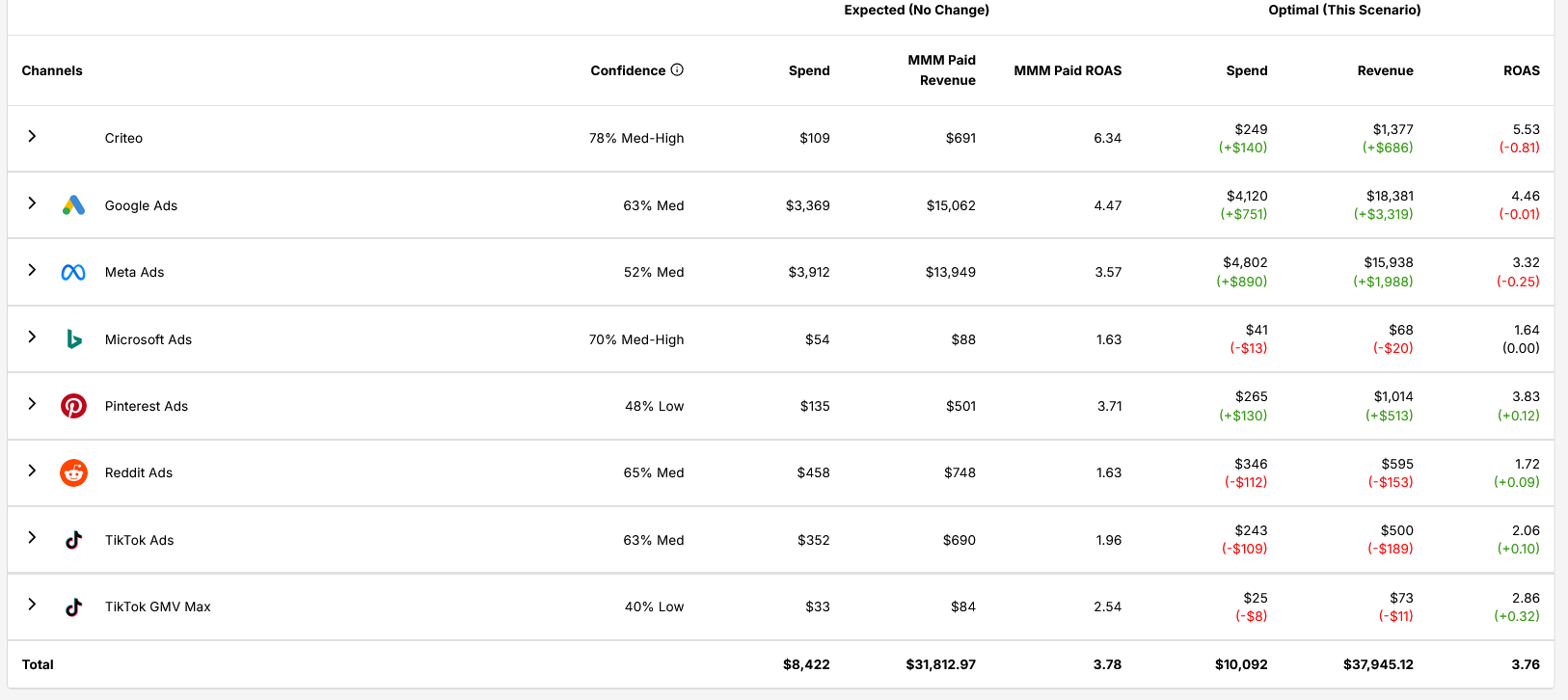
When you open Customize Recommendations, you can see all campaigns included in the scenario, their allocated spend after optimization, and a lock icon that lets you freeze individual campaigns at a specific spend level before re-running. Locking a campaign tells the optimizer to treat that spend as fixed and reallocate the rest of the budget around it.
This is the right tool for any situation where part of the recommendation makes sense but part of it doesn't. A new campaign in test mode that shouldn't be scaled yet. A campaign with a known audience ceiling. A brand campaign that's strategically fixed regardless of efficiency signals. Lock those, re-run, and evaluate the updated output with cleaner constraints. It’s less about overriding the model and more about giving it better information to work with.
Where Prescient comes in
The Optimizer is designed to do the hard mathematical work so you can focus on the strategic decisions only you can make. Finding the efficient frontier of your budget allocation (which campaigns to scale, which to pull back, and by how much) is exactly the kind of calculation that's faster and more reliable when a model does it. Your job is to evaluate the recommendations against the context the model doesn't have and decide what to act on.
If you're not yet using Prescient and want to see how the Optimizer surfaces recommendations and confidence scores together in practice, see how it can level up your budget allocation by booking a demo.
The Halo
Exclusive insights, every week.
Subscribe to The Halo for sharper marketing thinking.
You're subscribed to The Halo!
Quick question (optional): How familiar are you with MMM?
Thanks for sharing! Enjoy The Halo.
Keep reading
View all
Funnel strategy for digital marketing: How to build one where every stage earns its budget
Read article
How to improve direct mail response rates (& count the responses you're missing)
Read article
How effective is direct mail marketing? What the numbers show and what they miss
Read article
Top of funnel vs bottom of funnel: How they differ and how to balance your budget
Read article
Modern marketers need to be doing marketing scenario planning
Read article
How to actually optimize your ad spend (not just cut waste)
Read article